
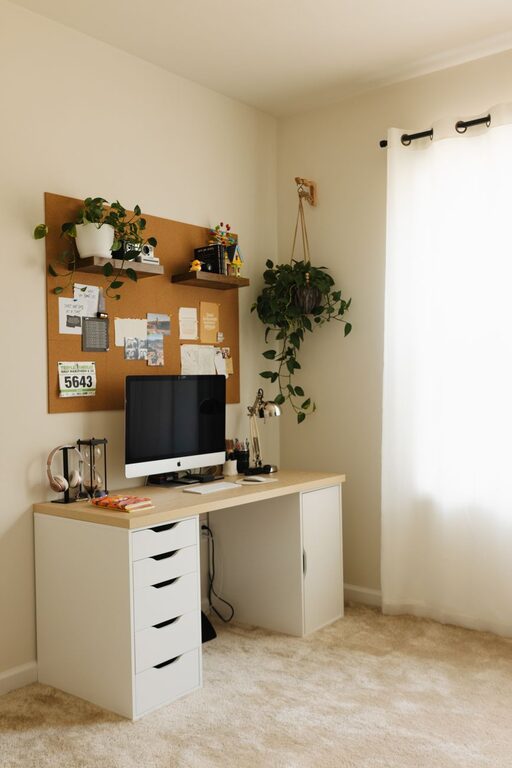
Creating a productive home workspace is essential for anyone working remotely or tackling personal projects. A well-designed setup not only helps you stay focused but also supports your physical well-being and mental clarity. Whether you have a dedicated room or a small corner, these tips will guide you toward creating an environment where you can do your best work.
Choose the Right Location
Find a Quiet Spot
Select a place in your home that is quiet and free from distractions. Ideally, this should be away from high-traffic areas like the kitchen or living room. Having a peaceful environment helps you concentrate better.
Consider Natural Light
Try to position your workspace near a window. Natural light can boost your mood and alertness, making it easier to stay productive. If natural light isn’t available, use a good quality desk lamp that mimics daylight.
Invest in Comfortable, Functional Furniture
Select an Ergonomic Chair
Comfortable seating is crucial. An ergonomic chair supports your back and encourages proper posture, reducing discomfort during long hours of work.
Choose a Suitable Desk
Pick a desk that fits your space and work style. It should be large enough to hold your computer, paperwork, and any other essentials without feeling cluttered.
Consider Adjustable Options
A sit-stand desk or adjustable desk setup lets you alternate between sitting and standing, promoting better circulation and reducing fatigue.
Organize and Declutter
Use Storage Solutions
Keep your workspace tidy with shelves, drawers, or storage boxes. Having designated places for your items helps you find what you need quickly and prevents clutter from piling up.
Limit Distractions
Remove items that don’t contribute to your work or focus. Personal items, unrelated books, or gadgets can be moved elsewhere to maintain a distraction-free zone.
Keep Essentials Within Reach
Place your most-used items—such as notebooks, pens, or headphones—close to you. This reduces interruptions caused by reaching for these items frequently.
Set Up Technology Efficiently
Invest in Reliable Equipment
A good quality computer, headset, and internet connection make a big difference. Make sure your technology supports your workflow without constant hiccups.
Arrange Cables Neatly
Use cable organizers or clips to keep cords untangled and out of sight. A clean cable setup looks better and prevents accidents.
Use Multiple Monitors
If your work requires multitasking or large spreadsheets, using more than one monitor can increase productivity and reduce eye strain.
Create a Routine and Personalize Your Space
Establish Boundaries
Define your work hours and stick to them. Inform household members of your schedule to minimize interruptions.
Decorate Thoughtfully
Personal touches like plants, artwork, or inspirational quotes can make your workspace inviting and encourage motivation. Just avoid overdecorating to prevent distractions.
Take Regular Breaks
Include short breaks in your schedule to stretch, hydrate, or relax. This helps maintain mental clarity and physical health.
Improve Air Quality and Comfort
Ventilate the Room
Fresh air reduces fatigue and improves focus. Open windows when possible or use an air purifier to maintain clean air.
Control Temperature
Keep the room at a comfortable temperature. Use fans, heaters, or air conditioning as needed to avoid discomfort.
Maintain Good Lighting
Avoid Glare
Position your computer screen and lighting to reduce glare and eye strain.
Use Task Lighting
A focused desk lamp can improve visibility for reading or detailed work.
—
Creating a productive home workspace takes some planning and intentionality, but the effort pays off with improved focus, reduced stress, and better work results. Start small, experiment with what works best for you, and adjust your setup as needed to build a home office environment where you can thrive.